Power BI Data Analyst Course

Master Power BI with live online training in DAX, dashboards, data visualization, and real-world projects.
Student Rating : 4.6
Instructor : Ranjit B Kate (Microsoft Certified Trainer)
Course Fees : Rs 15000 / $ 160
Live Instructor Led Course
Q&A session
Get Certified
Project Based Learning
Start Your Power BI Journey. New Batch Starts in Nov 26 !!
Fill out the enquiry form to receive course details, batch schedules, fees, and enrolment information.
Career Benefits of the Course
Improve Employability: Develop practical Power BI skills sought by employers across industries.
Master Power BI: Learn data modeling, DAX, Power Query, and interactive dashboards.
Hands-On Learning: Work on real-world projects and practical business case studies.
Build Job-Ready Skills: Gain expertise in data analysis, reporting, and business intelligence.
Learn from Experts: Get live, instructor-led training with expert guidance.
Create Interactive Dashboards: Transform raw data into meaningful business insights.
Boost Career Growth: Prepare for roles such as Power BI Developer, Data Analyst, and BI Analyst.
Earn a Course Certificate: Showcase your Power BI skills with a certificate of completion.
Batch Schedule
Batch Date: 14th Dec 2026
Batch Duration: 2 Months
Session Schedule: Only Friday
Session Duration: 2 hours
Batch Date: 15th Dec 2026
Batch Duration: 2 Months
Session Schedule: Only Saturday
Session Duration: 2 hours
Power BI Data Analyst Course : Course Content
Power BI Data Analyst Course – Beginner to Advanced
Become proficient in Microsoft Power BI with our Power BI Data Analyst Course, designed to help you develop practical skills in data analysis, data visualization, business intelligence, and interactive dashboard development. This instructor-led live online training covers the complete Power BI workflow, from connecting to multiple data sources and transforming raw data to building data models, writing DAX formulas, and publishing interactive reports.
Whether you are a student, working professional, MIS executive, Excel user, or aspiring data analyst, this course helps you build a strong foundation in Power BI and apply your learning to real-world business reporting scenarios.
Power BI Data Analyst Course – Curriculum
Module 1: Introduction to Power BI Desktop
- Introduction to Microsoft Power BI and Business Intelligence
- Overview of Power BI Desktop and its key components
- Installing and launching Power BI Desktop
- Understanding the Power BI interface and workspace
- Exploring the core areas of Power BI
- Understanding the Power BI development workflow
- Introduction to data loading, transformation, modeling, and visualization
- Understanding the Power BI report development process
Module 2: Connecting to Data Sources and Loading Data
- Understanding data sources supported by Power BI
- Connecting to Microsoft Excel workbooks
- Importing CSV and text files
- Connecting to databases
- Extracting data from web pages
- Loading data into Power BI Desktop
- Understanding data preview and navigation
- Exploring data import options
- Managing queries and data sources
- Understanding the fundamentals of data refresh
Module 3: Data Transformation Using Power Query
- Introduction to Power Query Editor
- Understanding queries and the Applied Steps pane
- Renaming, reordering, and removing columns
- Sorting and filtering data
- Removing duplicate records
- Identifying and handling error records
- Changing column names and data types
- Filtering rows and selecting relevant data
- Understanding query steps and transformation sequences
- Preparing structured datasets for reporting and analysis
Module 4: Data Cleaning, Shaping, and Data Mashup
- Detecting and changing data types
- Replacing values and handling inconsistent data
- Transforming column contents
- Filling values down and up
- Promoting the first row as column headers
- Grouping and aggregating data
- Duplicating and referencing queries
- Splitting and merging columns
- Creating custom and index columns
- Merging queries using different join options
- Appending multiple queries
- Combining files from a source folder
- Pivoting and unpivoting data
- Restructuring datasets for analytical reporting
- Understanding data mashup and query dependencies
Module 5: Data Modeling and Relationships
- Introduction to data modeling in Power BI
- Understanding fact tables and dimension tables
- Designing an effective star schema
- Understanding primary keys and foreign keys
- Creating relationships automatically and manually
- Understanding one-to-many, one-to-one, and many-to-many relationships
- Managing relationship cardinality and filter direction
- Editing, deleting, and deactivating relationships
- Understanding active and inactive relationships
- Building a reliable data model for accurate reporting
Module 6: Data Analysis Expressions (DAX)
- Introduction to DAX and its role in Power BI
- Understanding calculated columns, measures, and calculated tables
- Working with basic DAX syntax and expressions
- Aggregation functions:
SUM,COUNT, and related functions - Iterator functions:
SUMX,COUNTX,AVERAGEX, and others - Filter functions:
CALCULATE,CALCULATETABLE,FILTER,KEEPFILTERS,REMOVEFILTERS, andALL - Logical functions:
IF,AND,OR,SWITCH, andTRUE - Relationship functions:
RELATED,RELATEDTABLE, andUSERELATIONSHIP - Table manipulation functions:
ADDCOLUMNS,CROSSJOIN,NATURALINNERJOIN,SUMMARIZE,TOPN, andGENERATEALL - Understanding row context and filter context
- Writing reusable DAX measures for business reporting
- Applying DAX calculations to practical analytical scenarios
Module 7: Date Tables and Time Intelligence
- Understanding date tables and their importance
- Creating date tables using DAX
- Using
CALENDARandCALENDARAUTO - Working with date and time functions such as
DATE,DATEDIFF,EDATE, andEOMONTH - Marking and applying a date table
- Calculating Month-to-Date (MTD), Quarter-to-Date (QTD), and Year-to-Date (YTD) values
- Using time-intelligence functions such as
TOTALMTD,TOTALQTD,TOTALYTD,DATESMTD, andDATESQTD - Working with opening and closing balance calculations
- Applying date-range analysis using
DATESBETWEEN - Comparing current-period and previous-period performance
- Performing month-over-month, quarter-over-quarter, and year-over-year analysis
Module 8: Creating Data Visualizations in Power BI
- Understanding the report canvas, Visualizations pane, and Fields pane
- Creating tables and matrix visualizations
- Designing multi-row card visuals
- Understanding chart selection and formatting
- Creating column charts and bar charts
- Designing line charts and trend visualizations
- Creating pie charts and donut charts
- Building funnel charts and 100% stacked charts
- Creating scatter charts and bubble charts
- Designing waterfall charts and dual-axis visualizations
- Working with multiple data values in charts
- Formatting titles, labels, legends, axes, and data colors
- Using drill-down and hierarchical analysis
- Exploring the Play Axis feature for bubble charts
- Improving report readability and visual storytelling
Module 9: AI-Powered Visuals, Maps, and Advanced Analytics
- Introduction to AI-powered visualizations in Power BI
- Creating map and filled map visuals
- Working with geographical data
- Configuring and formatting map displays
- Creating treemap visualizations
- Using Q&A visuals to explore data with natural-language questions
- Applying Key Influencers to identify factors affecting business outcomes
- Using decomposition trees to investigate contributing factors
- Selecting suitable visuals for analytical requirements
- Presenting insights effectively through visual analysis
Module 10: Filtering, Slicers, and Report Interactivity
- Understanding filters in Power BI
- Applying visual-level filters
- Applying page-level filters
- Applying report-level filters
- Managing and clearing filters
- Understanding filter hierarchy and interactions
- Creating and formatting slicers
- Configuring slicer selection options
- Controlling interactions between visuals
- Choosing suitable filtering techniques for different reporting scenarios
- Developing interactive reports for business users
Module 11: Publishing and Sharing Reports Using Power BI Service
- Introduction to Power BI Service
- Understanding Power BI workspaces
- Publishing reports from Power BI Desktop
- Navigating published reports in Power BI Service
- Organizing and managing workspace content
- Sharing reports with users and stakeholders
- Understanding report access and sharing permissions
- Overview of cloud-based report consumption and collaboration
- Understanding the Power BI Desktop-to-Service deployment workflow
Who Should Enroll in This Power BI Course?
- Students and fresh graduates aspiring to enter the data analytics field.
- Working professionals looking to upgrade their data analysis skills.
- Excel users who want to move from spreadsheet reporting to interactive business intelligence dashboards.
- MIS executives and reporting professionals who want to improve their reporting capabilities.
- Finance, sales, marketing, operations, and HR professionals who work with business data.
- Aspiring Power BI Developers, Data Analysts, and Business Intelligence Analysts.
- Professionals looking to automate reporting workflows and make data-driven business decisions.
Why Choose Our Live Online Power BI Training?
Learn through structured, instructor-led online sessions that explain Power BI concepts step by step. Explore data preparation, modeling, DAX calculations, visualizations, and report publishing in a guided learning environment.
The course is designed to help you progress from Power BI fundamentals to advanced analytical techniques while developing skills that are relevant to workplace reporting and business intelligence requirements.
Start your Power BI learning journey today and develop the practical data analytics skills needed to transform raw data into meaningful insights and interactive reports.
Enquire now to learn more about the course schedule, upcoming batches, and enrollment details.
Power BI Data Analyst Course Highlights
Live Online Instructor-Led Training
Data Cleaning & Transformation
Advanced DAX & Data Modeling
Interactive Dashboards & Reports
Real-World Business Analysis
Career-Oriented Skill Development

About Instructor : Ranjit B Kate
Microsoft Certified Trainer and Data Analyst
Ranjit Kate is a Microsoft Certified Trainer and Data Analytics professional with 12+ years of experience in Excel, Power BI, SQL, Python and business analytics. He has trained professionals and created practical data analytics courses focused on real-world business applications.
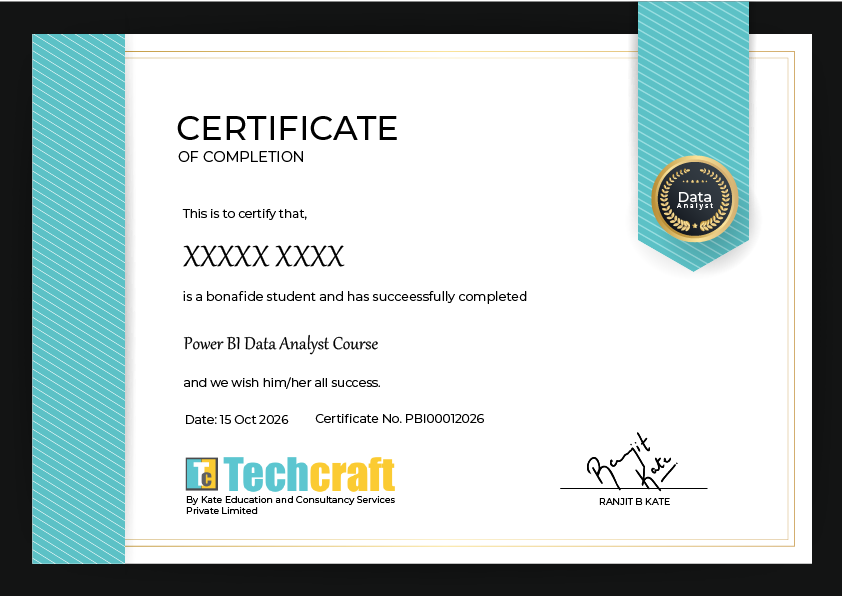
Earn Your Techcraft Certification
Earn a certificate upon successful completion of the Power BI Data Analyst Course to showcase your skills in data analysis, DAX, data modeling, and interactive dashboard development.
Professional Certificate of Completion: A formal certificate recognizing successful course completion.
Showcase Your Skills: Add your certification to your resume, LinkedIn profile, and professional portfolio.



Frequently Asked Questions – Power BI Data Analyst Course
What is the Power BI Data Analyst Course?
The Power BI Data Analyst Course is a comprehensive training program that teaches you how to connect, clean, transform, analyze, and visualize data using Microsoft Power BI. The course covers Power Query, data modeling, DAX formulas, interactive dashboards, AI-powered visuals, and report publishing using Power BI Service.
Who can enroll in this Power BI course?
This course is suitable for students, fresh graduates, working professionals, Excel users, MIS executives, finance professionals, and aspiring data analysts who want to develop practical data analysis and business intelligence skills.
Is this Power BI course suitable for beginners?
Yes. The course starts with the fundamentals of Power BI Desktop and gradually progresses to advanced topics such as DAX, data modeling, time intelligence, and interactive reporting. Beginners can develop their skills step by step
Do I need prior programming knowledge to learn Power BI?
No. Prior programming knowledge is not mandatory. You can start learning Power BI without a programming background. The course introduces Power Query M language and DAX gradually, helping you understand how to transform data and perform calculations.
What topics are covered in the Power BI Data Analyst Course?
The course covers Power BI Desktop, data connections, Power Query, data cleaning, M language, data modeling, star-schema design, DAX functions, time intelligence, data visualizations, AI-powered visuals, filters, slicers, and publishing reports to Power BI Service.
Will I learn DAX and Power Query in this course?
Yes. You will learn Power Query for data cleaning and transformation, along with DAX for creating measures, calculated columns, calculated tables, aggregations, filter-based calculations, and time-intelligence analysis.
Will I learn to create interactive Power BI dashboards?
Yes. You will learn to build interactive reports using charts, tables, matrices, slicers, filters, maps, drill-downs, and other visualizations. You will also explore AI-powered visuals such as Key Influencers and decomposition trees.
Is this a live online Power BI training course?
Yes. This is an instructor-led live online training program designed to explain Power BI concepts through structured sessions and practical demonstrations. You can enquire about upcoming batches, schedules, and session details before enrolling.
What career opportunities are available after learning Power BI?
Power BI skills are relevant to roles such as Data Analyst, Power BI Developer, Business Intelligence Analyst, MIS Analyst, and Reporting Analyst. Career opportunities depend on your overall skills, practical experience, qualifications, and the requirements of individual employers.
Will I receive a certificate after completing the course?
Techcraft offers a course certification subject to the applicable course completion requirements.