Certification in Advanced Excel, MIS Reporting & Data Analysis with AI

Master Advanced Excel, MIS Reporting, and AI-powered Data Analysis with live, instructor-led training and hands-on real-world projects.
Student Rating : 4.6
Instructor : Ranjit B Kate (Microsoft Certified Trainer)
Course Fees : Rs 9500 / $ 130
Live Instructor Led Course
Q&A session
Get Certified
Project Based Learning
Ready to Advance Your Career? New Batch Starts in Nov 26 !!
Fill out the enquiry form to receive course details, batch schedules, fees, and enrolment information.
Career Benefits of the Course
Improve Employability: Develop practical skills sought by employers across industries.
Access Better Job Opportunities: Prepare for roles such as MIS Executive, Reporting Analyst, Data Analyst, and Excel Specialist.
Advance Your Career: Strengthen your profile for promotions and higher-responsibility roles.
Increase Workplace Productivity: Automate repetitive tasks and reduce manual reporting effort.
Master Business Reporting: Create professional MIS reports, KPI dashboards, and management summaries.
Make Data-Driven Decisions: Analyze business data to identify trends, performance gaps, and opportunities.
Leverage AI at Work: Use AI tools to assist with Excel formulas, data analysis, and reporting workflows.
Batch Schedule
Batch Date: 20th Nov 2026
Batch Duration: 2 Months
Session Schedule: Only Friday
Session Duration: 2 hours
Batch Date: 28th Nov 2026
Batch Duration: 2 Months
Session Schedule: Only Saturday
Session Duration: 2 hours
Certification in Advanced Excel, MIS Reporting & Data Analysis with AI: Course Description
Upgrade your professional skills with Techcraft’s Certification in Advanced Excel, MIS Reporting & Data Analysis with AI, a live online, instructor-led training program designed for students, freshers, working professionals, job seekers, and business professionals.
This practical Advanced Excel and Data Analysis course helps you develop the skills required to manage business data, automate repetitive tasks, prepare professional MIS reports, build interactive dashboards, and generate meaningful insights using Excel and AI-powered tools.
What You’ll Learn in Advanced Excel Course:
Excel Fundamentals:
Navigate the Excel interface, enter and format data, use essential formulas, and apply logical functions effectively.
Cell Referencing Techniques:
Master relative, absolute, and mixed referencing to build flexible and reusable formulas.
Data Cleaning & Management:
Learn practical Excel methods to clean, organize, and structure raw data for reliable analysis.
Data Protection & Validation:
Safeguard your worksheets using validation rules, sheet protection, and controlled access features.
Lookups & Data Consolidation:
Retrieve and consolidate data using VLOOKUP, HLOOKUP, XLOOKUP, INDEX, and MATCH functions.
Sorting, Filtering & Conditional Formatting
Organize, filter, and visually highlight trends, anomalies, and key metrics in dynamic reports.
Charts & Data Visualization:
Create impactful Excel charts, Pivot Charts, and interactive dashboards to communicate data stories clearly.
Data Modeling, Pivot Tables & Power Pivot:
Analyze and summarize large datasets with powerful pivot tables and Power Pivot for advanced modeling.
Power Query for ETL:
Automate data extraction, transformation, and loading tasks with Power Query — a must-know tool for professionals.
Design Professional Dashboards for Reporting
Combine visuals, slicers, pivot charts, and KPIs into interactive dashboards to present performance insights.
Macros & Automation with VBA
Eliminate repetitive tasks by recording macros and understanding basic VBA scripting.
AI Features & Excel Copilot
Explore Excel’s latest AI tools including Copilot, to automate insights, perform smart analysis, and accelerate reporting.
Who Should Enroll?
- Students and freshers looking to develop job-ready Excel skills.
- Job seekers preparing for MIS Executive and reporting-related positions.
- Working professionals who want to improve their Excel and reporting capabilities.
- Finance, accounting, HR, sales, and operations professionals who work with business data.
- Business owners and managers who need better reporting and decision-making tools.
Career Opportunities
The skills covered in this program can help you prepare for roles such as:
- MIS Executive
- Reporting Analyst
- Advanced Excel Specialist
- Junior Data Analyst
- Business Reporting Executive
- Operations Analyst
Build practical expertise in Advanced Excel, MIS Reporting, and AI-powered Data Analysis with Techcraft. Learn to create better reports, analyze business information, and improve workplace productivity through structured, instructor-led online training.
Enquire today to receive the detailed syllabus, course fees, batch schedule, and enrolment information.
Advanced Excel, MIS Reporting & Data Analysis with AI Course Highlights
Beginner to Advanced Excel Training
Advanced Excel Formulas & Functions
Data Analysis with PivotTables
Power Query for Data Cleaning
Professional Excel Dashboards
AI & Microsoft Copilot in Excel
Macros & VBA Automation
Practical, Job-Oriented Learning

About Instructor : Ranjit B Kate
Microsoft Certified Trainer and Data Analyst
Ranjit Kate is a Microsoft Certified Trainer and Data Analytics professional with 12+ years of experience in Excel, Power BI, SQL, Python and business analytics. He has trained professionals and created practical data analytics courses focused on real-world business applications.
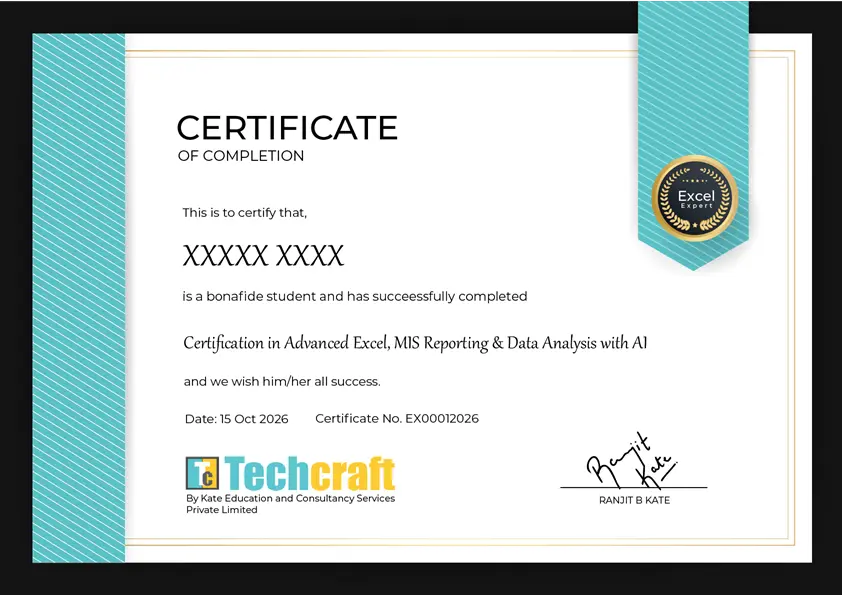
Earn Your Techcraft Certification
View a sample certificate awarded upon successful completion of the Certification in Advanced Excel, MIS Reporting & Data Analysis with AI program. Showcase your newly acquired skills and strengthen your professional profile with a certificate from Techcraft.
Professional Certificate of Completion: A formal certificate recognizing successful course completion.
Showcase Your Skills: Add your certification to your resume, LinkedIn profile, and professional portfolio.
Course Curriculum
- Introduction and Download Course Resources
- Getting started with Excel
- Complex Logical and Nested Formulas in Excel
- Data Cleaning Techniques in Excel
- Data Visualization and Charting in Excel
- Named Ranges in Excel
- Look Up And Reference Functions In Excel
- Data Protection and Data Validation in Excel
- Sorting and Filtering Data
- Conditional Formatting and Data Consolidation
- Pivot Tables and Pivot Charts
- Data Modeling using Power Pivot
- Excel Business Dashboard using Power Query, Power Pivot and Charting
- Macros for Automation and understanding VBA code of Macro
- AI Features in Excel
- Copilot in Excel : AI Assistant



Frequently Asked Questions – Advanced Excel Course
1. What is the Certification in Advanced Excel, MIS Reporting & Data Analysis with AI?
The Certification in Advanced Excel, MIS Reporting & Data Analysis with AI is a career-focused training program designed to help learners develop practical skills in advanced spreadsheet functions, MIS reporting, dashboard creation, data analysis, and AI-assisted productivity techniques.
Is this course conducted online or offline?
The course is conducted through live online, instructor-led sessions. Learners can interact with the trainer, ask questions, follow practical demonstrations, and develop their skills through guided exercises.
Who should enroll in this Advanced Excel and Data Analysis course?
This course is suitable for students, freshers, job seekers, working professionals, and business professionals who want to improve their Excel, reporting, and data analysis skills.
Do I need prior knowledge of Advanced Excel to join this course?
Basic computer knowledge and familiarity with spreadsheets are helpful. Contact Techcraft to confirm the recommended prerequisites for the upcoming batch.
What topics are covered in the course?
The course covers Advanced Excel formulas and functions, data cleaning, lookup functions, PivotTables, charts, dashboard creation, MIS reporting, business data analysis, reporting techniques, and the use of AI tools to support Excel and data analysis tasks.
What is MIS reporting, and why is it important?
MIS (Management Information System) reporting involves organizing business data into meaningful reports that help managers monitor performance, track key performance indicators (KPIs), and make informed business decisions. MIS reporting skills are useful in finance, sales, HR, operations, and other business functions.
How is AI used in Excel and data analysis?
AI tools can assist with generating and explaining formulas, understanding datasets, identifying trends, creating analysis summaries, and improving reporting workflows. The course introduces practical AI-assisted techniques, depending on the tools and topics included in the training curriculum.
Will I learn to create Excel dashboards and automated reports?
The course includes dashboard creation and reporting techniques using Excel features such as PivotTables, charts, and formulas. It also covers methods to streamline repetitive reporting tasks and improve productivity.
What career opportunities are available after completing this course?
The skills developed through this program can help learners prepare for roles such as MIS Executive, Reporting Analyst, Advanced Excel Specialist, Junior Data Analyst, and Business Reporting Executive. Actual job eligibility depends on individual qualifications, experience, and employer requirements.
Will I receive a certificate after completing the course?
Techcraft offers a course certification subject to the applicable course completion requirements.